Dedicated Sentinel + Agent Nodes
In this topology, the sentinel stays focused on control (routing + admission/policy), while your agents run on separate agent nodes.
It’s the natural next step after Agent on sentinel: clients still connect to a sentinel, but work moves off the control plane.
Shape
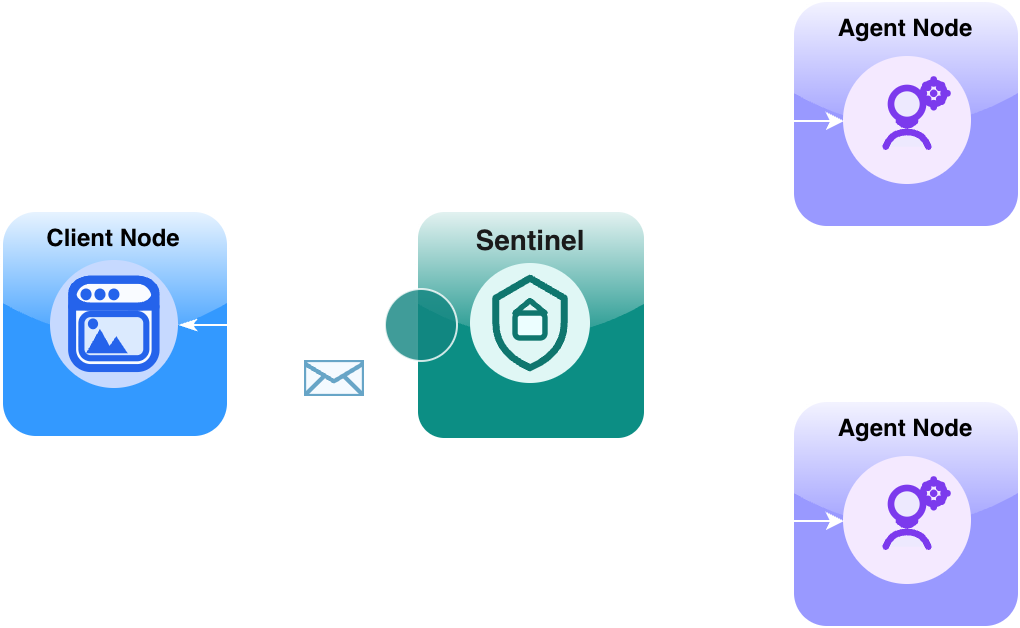
What changes vs agent on sentinel
Compared to Agent on sentinel:
- the sentinel no longer needs to host business logic,
- each agent runs on its own agent node (as shown),
- you can deploy/restart/scale agent nodes without disturbing the sentinel,
- and you get cleaner isolation between control and work.
What doesn’t change: clients still connect to the sentinel, and agent addressing stays the same.
Why this topology exists
This is the topology you reach for when the system stops being a toy and you want a real operational boundary:
- Fault isolation: crashy or experimental agents shouldn’t take down your front door.
- Independent scaling: scale agent nodes up/down without touching the control plane.
- Runtime flexibility: a single sentinel can route to TypeScript and Python agent nodes.
- Security boundaries: concentrate admission and policy in one place.
The mental model stays simple: clients talk to a sentinel; the sentinel routes; agents do the work.
If you’re coming from microservices: the sentinel plays the role of a policy-aware gateway/router for envelope traffic, while agent nodes are the workloads.
When to use
Use a dedicated sentinel when you:
- want a stable, policy-enforcing front door,
- need stronger fault isolation,
- plan to run multiple agents and scale them out,
- want to mix environments/runtimes (browser client → sentinel → Python/TS agent nodes),
- care about operational boundaries (deploy, restart, upgrade agents separately).
When not to use
You can skip this topology (for now) when:
- you’re still validating basics and agent on sentinel is enough,
- you’re intentionally staying single-process for learning/testing,
- you don’t want to think about multiple processes/machines yet.
Live demo
- Hello (dedicated sentinel, 3-node): https://examples-ts-hello-3node.naylence.io
This demo keeps the behavior simple and highlights the shape: a client node in front, a sentinel in the middle, and a dedicated agent node behind it.
Notes
- One agent per agent node (in these docs). It’s the clearest way to show isolation and scaling. (You can host multiple agents per node, but we don’t start there.)
- A node is not the same thing as a process. A single process can host multiple nodes (for example, in the browser-only demos), even though this topology conceptually separates roles into distinct nodes. In production you’ll typically run one container/VM per node for isolation and operations.
- Keep the sentinel thin. Prefer keeping heavy work out of the sentinel so it remains responsive and predictable.
- Clients are first-class nodes. A client node can listen, handle streaming, and host local logic — it’s not just a dumb caller.
Next step
Two natural directions from here:
- Put a multi-agent workflow behind the same sentinel model (workflow agent + workers).
- Explore browser-only fabrics as a zero-infra way to learn orchestration patterns: Browser-only fabric